← All articles · Introduction · about 6 min read
Meet the free online photo editor on tool80.com: Photoshop-style editing in your browser, no install, no sign-up
I run tool80.com, and this is the article I wish I could hand to every visitor who asks me the same question: "I just need to edit one photo — do I really have to install Photoshop for this?" No, you don't. That's exactly why we built our Online Photo Editor, and in this piece I'll introduce what it is, what it can do, and why it might be the last "free photo editor" tab you ever need to open. A hands-on tutorial series will follow — this one is the introduction.
What it is, in one sentence
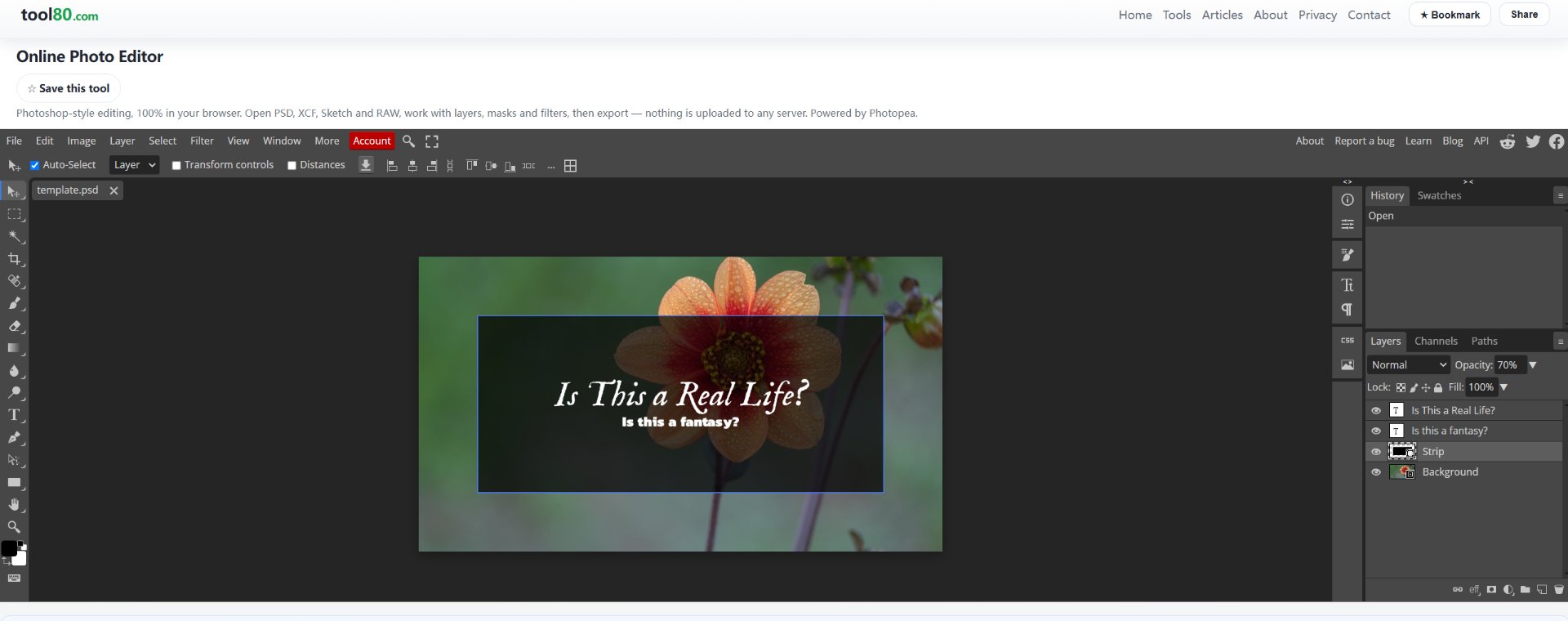
It's a full Photoshop-style image editor that runs entirely in your browser. Open the page and you're greeted by a familiar dark workspace: a toolbar on the left, menus across the top (File, Edit, Image, Layer, Select, Filter, View, Window), and panels on the right for layers, channels, paths and history. If you've used Photoshop at any point in the last fifteen years, you'll feel at home in about five seconds.
The part that surprised me: it opens PSD, XCF, Sketch and RAW
Most "free online photo editors" are toy apps — crop, rotate, slap a filter on it, done. This one is different, and this is the point I most want you to remember: it reads professional file formats natively.
Someone sends you a .psd file and you don't own Photoshop? Open it here, layers intact. A designer exported .xcf from GIMP? It opens. Your colleague works in Sketch and sent you a .sketch file on a Windows machine? No problem. It even reads certain camera RAW formats. Files like these are usually where free tools hit a wall — this editor treats them as first-class citizens, and you can save back to PSD when you're done, so your work stays round-trip compatible.
Real editing tools, not just filters
Because it's a full editor, the toolset goes far beyond one-click effects:
Layers and masks — the backbone of any serious edit. Stack images, blend them, mask out areas non-destructively. Selection tools — marquee, lasso, magic wand, quick selection, plus pen paths when you need pixel-precise edges. Text and shapes — with layer styles like drop shadow and stroke. Filters and adjustments — blur, sharpen, noise, curves, levels, hue/saturation. History panel — step back through every change, exactly like the desktop original.
In the screenshot above you can see a small project in progress: a photo layer, a dark overlay rectangle, and two text layers ("Is This a Real Life?" / "Is this a fantasy?") — all separate layers, all independently editable, opacity adjustable per layer. That's the kind of workflow people assume requires paid desktop software.
Why free online editing makes sense here
Nothing to install. The editor loads with the web page. No installer, no license key, no 4 GB download, no admin rights. It works on any machine with a modern browser — including the locked-down office PC where you can't install software.
Nothing to pay. No subscription, no watermark on your exports, no "free trial" timer. The editor is free to use, sustained by the ads shown inside it. For the vast majority of casual and even semi-professional editing tasks, that trade is very hard to beat.
Nothing to learn (again). If you already know Photoshop, you already know this tool — the shortcuts are the same (V for move, B for brush, Ctrl+J to duplicate a layer). And if you don't know Photoshop, the skills you learn here transfer directly.
Your files stay yours. Editing happens locally in your browser; there is no account to create and no cloud project your images get committed to. You open your file, you edit it, you export it — it goes where you put it.
Where it fits alongside our other image tools
On tool80.com, this editor anchors our Images category alongside focused, single-purpose tools: an image compressor, a resizer, an ICO converter, an ID photo maker, and an AI background remover. The way I use them together is simple: heavy lifting — compositing, retouching, text — happens in the photo editor; quick jobs like compression, resizing or background removal go to the dedicated one-click tools. Everything runs in the browser, on the same principle: open the tab, do the job, close the tab.
Who it's for
Students who need to submit a poster tonight and can't install software on the library PC. Freelancers who occasionally receive PSD files and don't want to subscribe to anything just to open them. Small online sellers who need product photos cleaned up — text added, background replaced, size normalized. And anyone who once paid for Photoshop, uses ten percent of it, and knows it.
What's next
This article is the introduction. In the follow-up series I'll write step-by-step tutorials: opening and saving PSD files, cutting out a subject with selection tools and masks, adding and styling text layers, and exporting for web with the right format and quality. If there's a specific task you'd like covered first, tell me — the contact link is in the footer.
Until then, the editor is a member tool — subscribe for $1/month on Ko-fi and open it any time at tool80.com/tools/photo-editor. Bookmark it once, and you'll never again stand in front of a .psd file wondering how to open it.